Optimization in Django

Optimizing a Django application is crucial for ensuring that it runs efficiently, especially under heavy load or with large datasets. There are various aspects of a Django application you can optimize, including database interactions, middleware, static files, and overall code efficiency. Below are detailed strategies and practices to help you optimize your Django application:
1. Database Optimization
a. Efficient Queries
Use Select Related and Prefetch Related:
select_related: Reduces the number of database queries by performing a SQL join and including the fields of the related object.prefetch_related: Performs a separate lookup for each relationship and performs the join in Python.
    # Using select_related for foreign key relationships
    books = Book.objects.select_related('author').all()

    # Using prefetch_related for many-to-many relationships
    books = Book.objects.prefetch_related('categories').all()
Avoid N+1 Query Problems:
- Ensure you're not performing queries inside a loop that could be done with a single query.
    # Inefficient way
    for book in Book.objects.all():
        print(book.author.name)  # This performs a separate query for each book

    # Efficient way
    books = Book.objects.select_related('author').all()
    for book in books:
        print(book.author.name)  # Single query with join
Use
.only()and.defer():- Load only the fields you need to save memory and speed up queries.
    # Load only specific fields
    books = Book.objects.only('title', 'published_date').all()

    # Load all fields except specified ones
    books = Book.objects.defer('content').all()
Database Indexing:
- Use database indexes on columns that are frequently searched or used in filters.
    class Book(models.Model):
        title = models.CharField(max_length=255, db_index=True)
        # or add index in the migration
        class Meta:
            indexes = [
                models.Index(fields=['title']),
            ]
b. Query Aggregation
Use Django’s aggregation functions to perform operations like
SUM,AVG,COUNT, directly in the database.from django.db.models import Sum total_pages = Book.objects.aggregate(Sum('pages'))
2. Caching
Database Query Caching:
- Use Django’s caching framework to cache results of expensive queries.
    from django.core.cache import cache

    def get_books():
        books = cache.get('all_books')
        if not books:
            books = Book.objects.all()
            cache.set('all_books', books, 300)  # Cache for 5 minutes
        return books
View Caching:
- Use
cache_pagedecorator to cache entire views.
- Use
    from django.views.decorators.cache import cache_page

    @cache_page(60 * 15)  # Cache for 15 minutes
    def my_view(request):
        ...
Template Fragment Caching:
- Cache parts of your templates that don't change often.
    {% load cache %}
    {% cache 600 sidebar %}
        ... sidebar content ...
    {% endcache %}
3. Middleware Optimization
Reduce Middleware:
- Only use the middleware that is absolutely necessary to minimize processing time for each request.
Custom Middleware:
- Implement your own lightweight middleware if you need specific functionality.
    class CustomHeaderMiddleware:
        def __init__(self, get_response):
            self.get_response = get_response

        def __call__(self, request):
            response = self.get_response(request)
            response['X-Custom-Header'] = 'Value'
            return response
4. Static Files and Media
Use a CDN:
- Serve static and media files through a CDN to offload traffic and reduce latency.
Static File Compression:
- Use tools like
whitenoiseor Django’sManifestStaticFilesStorageto compress static files.
- Use tools like
    # settings.py
    STATICFILES_STORAGE = 'whitenoise.storage.CompressedManifestStaticFilesStorage'
Optimize Images:
- Use optimized image formats and tools to compress images without losing quality.
5. Code Optimization
Use Django's Built-in Functions and Utilities:
- Django provides a lot of utilities that are optimized and battle-tested. Avoid reinventing the wheel.
Optimize Algorithm and Data Structures:
- Review and optimize your algorithms and data structures to ensure they are efficient.
Reduce Complexity:
- Simplify complex code structures to make them easier to understand and maintain.
Lazy Loading:
- Use Django’s lazy loading to defer database accesses until necessary.
    from django.utils.functional import lazy

    lazy_function = lazy(your_function, str)
Avoid Unnecessary Object Creation:
- Be mindful of creating unnecessary objects or data structures that can be avoided.
6. Django Settings Optimization
Debug Mode:
- Always turn off
DEBUGmode in production to improve performance and security.
- Always turn off
DEBUG = False
Database Connection Pooling:
- Use connection pooling for better database performance.
    # settings.py example using django-db-geventpool
    DATABASES = {
        'default': {
            'ENGINE': 'django.db.backends.postgresql',
            'NAME': 'yourdbname',
            'USER': 'yourdbuser',
            'PASSWORD': 'yourdbpassword',
            'HOST': 'localhost',
            'PORT': '5432',
            'OPTIONS': {
                'MAX_CONNS': 20,
            }
        }
    }
Gzip Compression:
- Enable Gzip middleware to compress responses and reduce bandwidth.
    MIDDLEWARE = [
        'django.middleware.security.SecurityMiddleware',
        'django.middleware.gzip.GZipMiddleware',
        ...
    ]
7. Asynchronous Processing
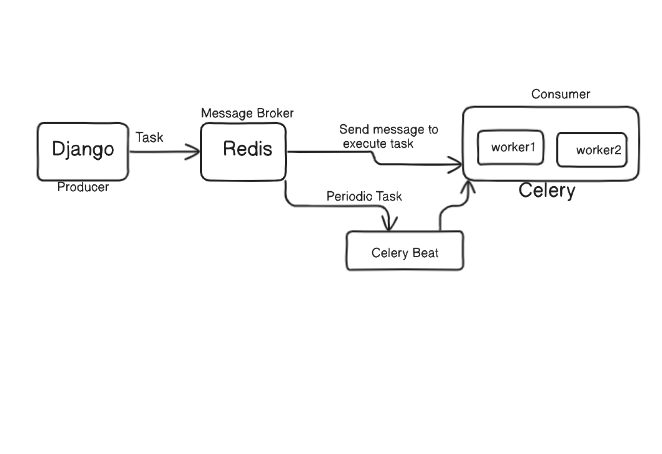
Use Celery for Background Tasks:
- Offload long-running or resource-intensive tasks to Celery to keep your web requests fast.
    from celery import shared_task

    @shared_task
    def long_running_task(arg1, arg2):
        # perform the task
Async Views:
- Use Django’s support for async views to handle I/O-bound operations more efficiently.
    def my_async_view(request):
        await asyncio.sleep(1)  # Simulating an async operation
        return JsonResponse({'status': 'done'})
8. Profiling and Monitoring
Use Profiling Tools:↳
- Tools like
django-debug-toolbarfor development orcProfilefor more detailed profiling can help identify bottlenecks.
- Tools like
    # Install django-debug-toolbar
    pip install django-debug-toolbar

    # settings.py
    INSTALLED_APPS = [
        ...
        'debug_toolbar',
    ]

    MIDDLEWARE = [
        ...
        'debug_toolbar.middleware.DebugToolbarMiddleware',
    ]

    INTERNAL_IPS = ['127.0.0.1']
Monitoring:
- Implement monitoring solutions (like New Relic, Datadog, or Sentry) to track performance and identify issues in production.
9. Security Optimizations
Secure Settings:
- Ensure settings like
SECURE_SSL_REDIRECT,SECURE_HSTS_SECONDS, andSESSION_COOKIE_SECUREare enabled in production for better security which also affects performance by reducing attack vectors.
- Ensure settings like
    SECURE_SSL_REDIRECT = True
    SECURE_HSTS_SECONDS = 31536000
    SESSION_COOKIE_SECURE = True
10. Server and Deployment Optimization
Use Gunicorn/UWSGI:
- Use a robust application server like Gunicorn or uWSGI for serving your Django app in production.
gunicorn myproject.wsgi:application --workers 3
Load Balancing:
- Implement load balancing to distribute traffic evenly across multiple servers or instances.
Optimize Database:
Regularly analyze and optimize your database queries and indexes.
Use tools like
pg_stat_statementsfor PostgreSQL to monitor query performance.
11. Advanced Database Optimization
a. Optimizing Database Schema
Normalization and Denormalization:
Normalization helps reduce data redundancy and improves data integrity by organizing tables and relationships.
Denormalization can improve read performance by reducing the need for joins, especially for read-heavy workloads.
Partitioning:
- Partition large tables to improve query performance and manageability. This is useful for tables with a large number of rows.
    CREATE TABLE my_partitioned_table (
        id SERIAL PRIMARY KEY,
        data TEXT,
        created_at TIMESTAMP
    ) PARTITION BY RANGE (created_at);

    CREATE TABLE my_partitioned_table_2024_01 PARTITION OF my_partitioned_table
    FOR VALUES FROM ('2024-01-01') TO ('2024-02-01');
Indexing Strategies:
Use multi-column indexes for queries that filter on multiple columns.
Use partial indexes for filtering rows based on specific conditions.
Consider full-text search indexes for text search fields.
    # Django example of multi-column index
    class MyModel(models.Model):
        field1 = models.CharField(max_length=100)
        field2 = models.CharField(max_length=100)

        class Meta:
            indexes = [
                models.Index(fields=['field1', 'field2']),
            ]
b. Query Optimization Techniques
Use Raw SQL for Complex Queries:
- Sometimes, Django ORM can’t express complex queries efficiently. Use raw SQL queries where necessary.
    from django.db import connection

    def get_custom_results():
        with connection.cursor() as cursor:
            cursor.execute("SELECT * FROM my_table WHERE some_complex_condition")
            rows = cursor.fetchall()
        return rows
Analyze Query Plans:
- Use database-specific tools to analyze and optimize query execution plans (e.g.,
EXPLAINin PostgreSQL).
- Use database-specific tools to analyze and optimize query execution plans (e.g.,
EXPLAIN ANALYZE SELECT * FROM my_table WHERE condition = 'value';
12. Django Settings Optimization
a. Middleware Configuration
Middleware Ordering:
- The order of middleware affects performance. Place lighter middleware that can terminate early higher in the list.
Custom Middleware for Performance:
- Implement custom middleware to handle specific performance-related tasks, like logging or early termination of requests.
b. Efficient Static and Media File Handling
Use Django’s Built-in Storage Backends:
- Use
django-storagesto efficiently handle static and media files with cloud storage solutions like AWS S3 or Google Cloud Storage.
- Use
    # settings.py
    DEFAULT_FILE_STORAGE = 'storages.backends.s3boto3.S3Boto3Storage'
    STATICFILES_STORAGE = 'storages.backends.s3boto3.S3Boto3Storage'
Asset Compression and Minification:
- Use tools like
django-compressorto compress and minify CSS and JavaScript files.
- Use tools like
    # settings.py
    COMPRESS_ENABLED = True
    COMPRESS_URL = STATIC_URL
    COMPRESS_ROOT = STATIC_ROOT
13. Server and Deployment Optimization
a. Application Server Tuning
Gunicorn Configuration:
- Configure Gunicorn with appropriate worker types (sync vs. async) and numbers based on your application needs.
gunicorn myproject.wsgi:application --workers 3 --worker-class gevent --timeout 120
uWSGI Optimization:
- Tune uWSGI settings for maximum performance, such as process management, caching, and threading.
    [uwsgi]
    module = myproject.wsgi:application
    master = true
    processes = 4
    threads = 2
    harakiri = 60
b. Load Balancing and Scaling
Horizontal Scaling:
Scale horizontally by deploying multiple instances of your application behind a load balancer.
Use Docker and Kubernetes for container orchestration and scaling.
Auto-Scaling:
- Implement auto-scaling based on metrics like CPU usage or request rate to handle varying loads dynamically.
Database Sharding:
- Consider database sharding for very large datasets to distribute data across multiple databases and improve performance.
14. Security Enhancements
a. Secure Application Settings
Secure Password Storage:
- Use strong hashing algorithms for storing passwords (Django uses PBKDF2 by default, which is secure).
Use HTTPS Everywhere:
- Ensure that your application is served over HTTPS to encrypt data in transit.
    # settings.py
    SECURE_SSL_REDIRECT = True
    SECURE_HSTS_SECONDS = 31536000
b. Preventing Common Attacks
SQL Injection Prevention:
- Always use Django ORM to interact with the database instead of raw SQL to avoid SQL injection vulnerabilities.
Cross-Site Scripting (XSS) Protection:
- Use Django’s built-in template system that auto-escapes data, or manually escape user-generated content.
{{ user_input|escape }}
Cross-Site Request Forgery (CSRF) Protection:
- Ensure CSRF protection is enabled for all forms and API requests.
    <form method="post">
        {% csrf_token %}
        ...
    </form>
15. Performance Monitoring and Profiling
a. Application Performance Monitoring (APM)
Implement APM Tools:
- Use tools like New Relic, Datadog, or AppDynamics to monitor your application’s performance in real-time.
    # Example: Integrating New Relic
    import newrelic.agent
    newrelic.agent.initialize('/path/to/newrelic.ini')

    application = get_wsgi_application()
b. Advanced Profiling
Use Profiling Tools:
- Tools like
cProfile,line_profiler, ordjango-silkcan help identify performance bottlenecks at a fine-grained level.
- Tools like
    import cProfile
    cProfile.run('my_function()')
Analyze Memory Usage:
- Use tools like
memory_profilerto analyze and optimize memory usage.
- Use tools like
    from memory_profiler import profile

    @profile
    def my_function():
        ...
16. Optimizing Django's ORM and Model Usage
a. Efficient Model Design
Use Appropriate Field Types:
- Choose the right field types based on data and query requirements to optimize storage and access patterns.
    class Product(models.Model):
        name = models.CharField(max_length=255)
        price = models.DecimalField(max_digits=10, decimal_places=2)
Optimize Model Inheritance:
- Use multi-table inheritance or abstract base classes wisely to balance performance and data design.
    class CommonInfo(models.Model):
        name = models.CharField(max_length=100)
        age = models.PositiveIntegerField()

        class Meta:
            abstract = True

    class Student(CommonInfo):
        home_group = models.CharField(max_length=5)
b. QuerySet Optimization
Bulk Operations:
- Use bulk operations (
bulk_create,bulk_update) for inserting or updating large datasets efficiently.
- Use bulk operations (
    # Bulk create example
    Book.objects.bulk_create([
        Book(title='Book 1', author=author),
        Book(title='Book 2', author=author),
    ])
Avoiding Lazy Evaluation:
- Be mindful of when QuerySets are evaluated to avoid unnecessary database hits. Use list() to force evaluation.
books = list(Book.objects.filter(author='Author Name'))
17. Utilizing Asynchronous Capabilities
a. Django Channels
WebSockets and Background Tasks:
- Use Django Channels to handle WebSockets, background tasks, or long-running processes asynchronously.
    # consumers.py
    from channels.generic.websocket import WebsocketConsumer

    class ChatConsumer(WebsocketConsumer):
        def connect(self):
            self.accept()

        def disconnect(self, close_code):
            pass

        def receive(self, text_data):
            self.send(text_data="Echo: " + text_data)
b. Async Views and Tasks
Async Views:
- Use Django’s async views for I/O-bound tasks to improve request handling.
    from django.http import JsonResponse

    async def async_view(request):
        await asyncio.sleep(1)
        return JsonResponse({'status': 'completed'})
Celery for Distributed Tasks:
- Use Celery to handle distributed task queues, allowing you to offload processing from the main application thread.
    from celery import shared_task

    @shared_task
    def add(x, y):
        return x + y
18. Frontend and API Optimization
a. Optimizing APIs
Use DRF Efficiently:
- Django Rest Framework (DRF)
Summary
Optimizing a Django application requires a multi-faceted approach, addressing various layers from the database to the frontend. Here’s a summary of steps:↳
Optimize database queries and use efficient querying techniques.
Implement caching strategies for queries, views, and templates.
Minimize middleware to only essential functions.
Efficiently handle static files and use CDNs for distribution.
Write clean, efficient, and optimized code.
Fine-tune Django settings for better performance and security.
Use asynchronous processing for long-running tasks.
Regularly profile and monitor the application to detect and resolve performance issues.
Secure your application to prevent vulnerabilities and reduce unnecessary processing overhead.
Optimize your deployment setup with appropriate application servers, load balancing, and database tuning.
By systematically applying these practices, you can significantly improve the performance, scalability, and reliability of your Django application.