A context manager is an object that defines a runtime context and provides methods to establish and clean up the context. It is used with the with statement in Python to manage resources effectively and ensure that necessary cleanup (like closing a file or releasing a lock) happens automatically.
Basic Use of Context Managers
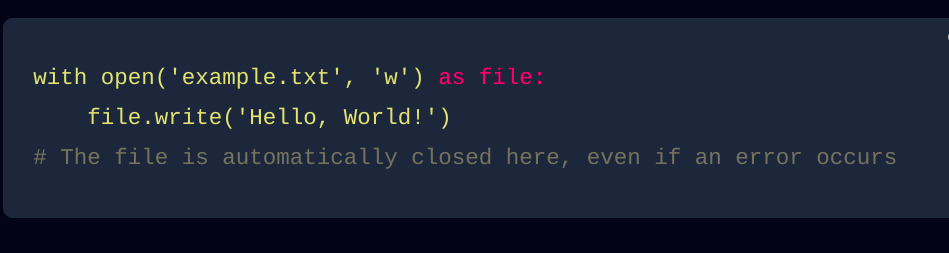
The most common use of a context manager is with the with statement, which simplifies resource management by automatically handling the setup and teardown.
Example: File Handling
with open('example.txt', 'w') as file:
    file.write('Hello, World!')
# The file is automatically closed here, even if an error occurs
Creating Custom Context Managers
You can create custom context managers using two primary methods:
Classes with
__enter__and__exit__methods.Functions using the
contextlibmodule.
1. Context Managers Using Classes
To create a context manager using a class, you need to define the __enter__ and __exit__ methods.
__enter__(self): This method is executed when thewithblock is entered. It returns the resource to be managed.__exit__(self, exc_type, exc_val, exc_tb): This method is executed when thewithblock is exited. It handles any cleanup and can process exceptions.
Example:
class ManagedResource:
    def __init__(self, name):
        self.name = name

    def __enter__(self):
        print(f"Acquiring resource: {self.name}")
        return self  # This value will be bound to the target specified in the with statement

    def __exit__(self, exc_type, exc_val, exc_tb):
        print(f"Releasing resource: {self.name}")
        # Handle exceptions if necessary
        if exc_type:
            print(f"An error occurred: {exc_val}")
        return False  # Do not suppress exceptions

# Usage
with ManagedResource('Database Connection') as resource:
    print(f"Using resource: {resource.name}")
Output:
Acquiring resource: Database Connection
Using resource: Database Connection
Releasing resource: Database Connection
- Explanation: The
__enter__method acquires the resource, and the__exit__method releases it. Thewithblock ensures these methods are called automatically.
2. Context Managers Using the contextlib Module
The contextlib module provides utilities for creating context managers, including the contextmanager decorator, which allows you to write context managers as generator functions.
Example:
from contextlib import contextmanager

@contextmanager
def managed_resource(name):
    print(f"Acquiring resource: {name}")
    yield name  # The value to bind to the target specified in the with statement
    print(f"Releasing resource: {name}")

# Usage
with managed_resource('File Handler') as resource:
    print(f"Using resource: {resource}")
Output:
Acquiring resource: File Handler
Using resource: File Handler
Releasing resource: File Handler
- Explanation: The
yieldstatement in the generator function marks the point where thewithblock starts. The code beforeyieldruns when entering thewithblock, and the code afteryieldruns upon exiting.
Advanced Use Cases
Context managers are not limited to simple file handling or resource management. They can be used in various complex scenarios:
1. Managing Database Connections
class DatabaseConnection:
    def __init__(self, db_url):
        self.db_url = db_url

    def __enter__(self):
        self.connection = self.connect_to_database()
        return self.connection

    def __exit__(self, exc_type, exc_val, exc_tb):
        self.close_database_connection(self.connection)
        if exc_type:
            print(f"An error occurred: {exc_val}")

    def connect_to_database(self):
        print(f"Connecting to database at {self.db_url}")
        return "db_connection"  # Simulating a database connection

    def close_database_connection(self, connection):
        print(f"Closing database connection: {connection}")

# Usage
with DatabaseConnection('sqlite:///:memory:') as db_conn:
    print(f"Using database connection: {db_conn}")
Output:
Connecting to database at sqlite:///:memory:
Using database connection: db_connection
Closing database connection: db_connection
2. Temporary File Handling
import tempfile
import os

@contextmanager
def temporary_file():
    fd, path = tempfile.mkstemp()  # Create a temporary file
    try:
        yield path  # Provide the file path to the with block
    finally:
        os.close(fd)  # Close the file descriptor
        os.remove(path)  # Remove the file

# Usage
with temporary_file() as temp_path:
    print(f"Using temporary file at: {temp_path}")
    with open(temp_path, 'w') as file:
        file.write('Temporary data')

    # The temporary file is automatically removed after the with block
Output:
Using temporary file at: /tmp/tmpabcd1234
3. Timing Code Execution
import time

@contextmanager
def timer():
    start_time = time.time()
    yield
    end_time = time.time()
    print(f"Elapsed time: {end_time - start_time} seconds")

# Usage
with timer():
    # Simulate a time-consuming task
    time.sleep(2)
Output:
Elapsed time: 2.0001 seconds
Best Practices and Tips
Resource Management: Use context managers to handle resources like files, network connections, or locks. This ensures that resources are released properly even if an error occurs.
Exception Handling: The
__exit__method can handle exceptions that occur within thewithblock. ReturningTruefrom__exit__suppresses the exception; otherwise, it propagates.Reusability: Design your context managers to be reusable and modular. This makes your code cleaner and easier to maintain.
Avoid Complexity: If a context manager becomes too complex, consider breaking it into simpler components or using multiple context managers nested or combined using
contextlib.ExitStack.Nesting Context Managers: Python 3.1 introduced the ability to use multiple context managers in a single
withstatement, which can be more concise and readable.with open('file1.txt', 'r') as f1, open('file2.txt', 'w') as f2: f2.write(f1.read())Debugging: Use
printstatements or logging inside__enter__and__exit__methods to help debug and understand the flow of your context managers.
Conclusion
Context managers are a powerful feature of Python that provide a robust and clean way to manage resources. By mastering context managers, you can write more reliable and maintainable code. Whether you're handling files, managing connections, or timing code execution, understanding and using context managers will make your Python code more professional and resilient.
About the author
"Passionate software developer with a focus on Python. Driven by a love for technology and a constant desire to explore and learn new skills. Constantly striving to push the limits and create innovative solutions.”
Comments
Join the discussionNo comments yet. Be the first to comment.